
Scan. Order. Pay.
From the Table.
OMASYS makes it easy for customers to order directly from their table — scan the QR code, browse your digital menu, and pay in one seamless flow. No app download required.
Overview
What Is OMASYS?
OMASYS is a cafe and restaurant order management system that digitizes the entire ordering process — from menu browsing to payment — directly from the customer’s smartphone.
OMASYS lets customers scan a QR code at their table, view your branded digital menu with images and prices, place their order, and pay — all on one screen, without downloading any app.
Why OMASYS?
Features
Everything Your Cafe or Restaurant Needs
OMASYS includes all the tools to run a modern digital ordering experience — plus exciting features coming soon.
Exclusive Branding
Customize the app with your restaurant’s logo, name, colors, and promotional banners. Your customers see your brand, not ours.
Scan QR Menu
Place a QR code on each table. Customers scan it with any smartphone camera and are taken directly to your digital menu — no app needed.
Online Menu
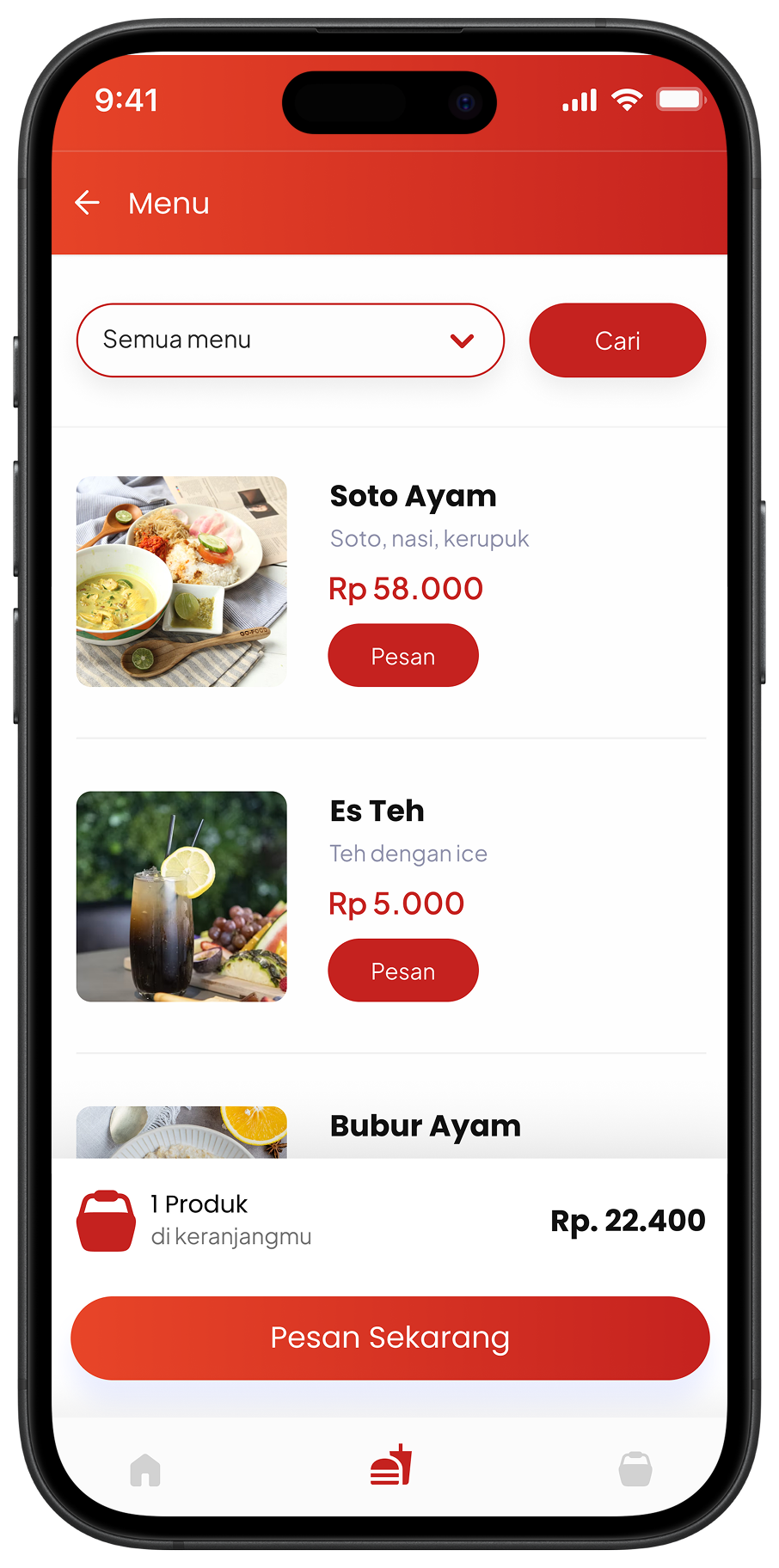
Beautiful digital menu with food photos, descriptions, prices, categories, and promo labels. Easy to update anytime from the dashboard.
Online Order
Customers select items, add notes, choose Dine In / Take Away / Self Pick Up, and submit their order — all from their phone at the table.
Order & Sales Report
Track daily orders, popular items, revenue, and transaction history through the merchant dashboard in real-time.
Multi Outlet / Branch
Manage multiple cafe or restaurant outlets from a single dashboard — coming in the next update.
Table Reservation
Allow customers to reserve tables in advance directly through the OMASYS platform.
Inventory Management
Track ingredient stock, set alerts for low inventory, and sync with your menu availability automatically.
Voucher & Promo Code
Customers can input voucher or promo codes at checkout. Drive repeat visits with targeted discount campaigns.
How It Works for Customers
From QR Scan to Payment in Minutes
The entire ordering flow is designed to be fast and frictionless for both customers and your staff.
1. Scan QR
Customer scans the QR code on the table and is taken to the menu page instantly.
2. Browse Menu
Digital menu shows food photos, descriptions, prices, and promo items by category.
3. Place Order
Select items, add notes, choose quantity, and apply voucher/promo code if available.
4. Pay & Done
Pay via online gateway (credit card, bank transfer) or choose cash at the cashier. E-receipt generated instantly.
User Interface
Three Screens. One Seamless Experience.
OMASYS is designed to be intuitive for customers and easy for your team to manage.
🏠 Home Screen
🍽️ Menu Screen
🛒 My Order Screen
Pricing
Simple, Transparent Pricing
No monthly subscription. No setup fee. Start for free — only pay when you earn.
Getting Started
Set Up OMASYS in 4 Steps
From registration to your first QR code on the table — the onboarding process is fast and fully supported.
Register
Sign up your restaurant or cafe and complete the basic profile setup.
Set Up Menu
Add your menu items with photos, descriptions, prices, and categories.
Print QR Codes
Generate and print QR codes for each table — or display them digitally.
Go Live!
Your customers can now scan, order, and pay from the table instantly.
FAQ
Frequently Asked Questions
Everything you need to know about OMASYS.
What is OMASYS?
OMASYS is a cafe and restaurant order management system. Customers scan a QR code at the table to view the digital menu, place orders, and pay — all from their smartphone, no app download needed.
How much does OMASYS cost?
OMASYS is completely free for merchants (Rp 0 subscription). The only cost is a 3% app fee per transaction when customers pay online through the platform. Cash payments have no fee.
Do customers need to download an app?
No. Customers simply scan the QR code with their phone’s camera and are directed to your digital menu in the browser — no app installation required.
What payment methods are supported?
OMASYS supports cash payment (confirmed by your cashier) and online payment gateway including credit card and bank transfer (optional integration).
Can I customize the app with my restaurant’s branding?
Yes. OMASYS features Exclusive Branding — your restaurant’s logo, name, and color theme are displayed throughout the ordering experience.
How do I get started with OMASYS?
Contact us via WhatsApp at +62 811 386 2200, email marketing@studiokami.com, or visit us at Jl. Serma Made Pil No.10B, Denpasar, Bali for a free setup consultation.
Start Today — It’s Free
Ready to Go Digital with OMASYS?
Talk to our team for a free setup consultation. Get your QR menu live in no time — no commitment required.
WhatsApp / Phone
+62 811 386 2200Address
Jl. Serma Made Pil No.10B,, Denpasar, Bali