
Show Live Flight Schedules on Your TV Screen
Flight Schedule TV displays real-time airport arrival and departure schedules directly on any TV. Easy to install, easy to control — ideal for hotels, cafes, travel agents, and public spaces.
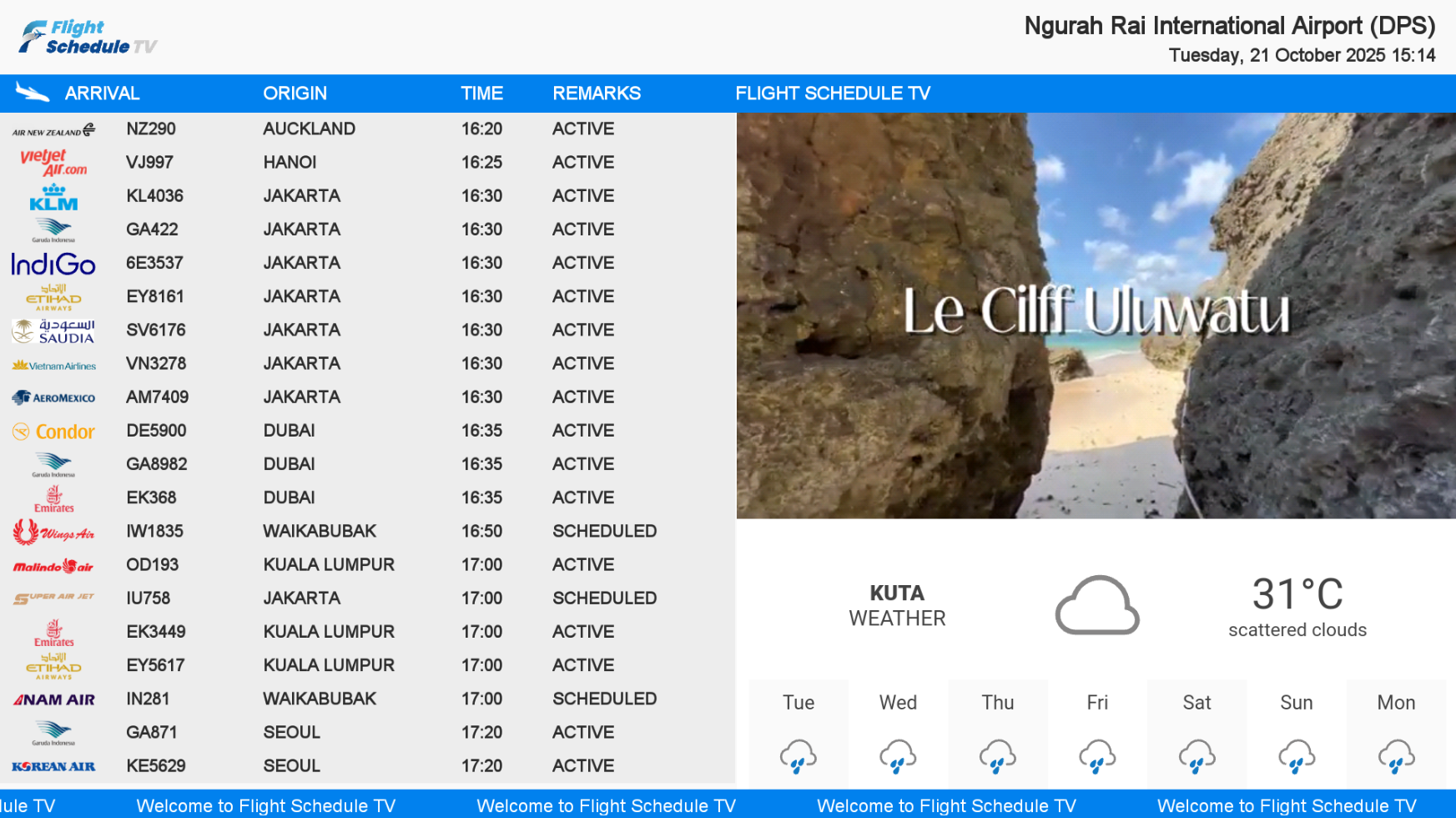
Overview
What Is Flight Schedule TV?
Flight Schedule TV is a digital display system that streams real-time airport flight information — arrivals and departures — directly to any TV screen in your venue.
Flight Schedule TV connects to live airport data and displays up-to-date flight schedules with status (Scheduled, Active, Cancelled), weather forecast, custom branding, video content, and a running text ticker — all on one screen, fully controlled from a central dashboard.
Why Flight Schedule TV?
Features
Everything on One Screen
Flight Schedule TV packs multiple useful features into one elegant display — keeping your guests informed and your brand visible.
Custom Branding
Display your hotel or business logo on the screen alongside flight data. Keep your brand front and center for every guest.
All Airports Worldwide
Not limited to Indonesian airports. Display real-time flight schedules from any airport in the world — set by you.
Realtime Flight Schedule
Live data — flight number, airline, origin/destination, time, and status (Scheduled, Active, Cancelled) updated automatically.
Video Display Space
Allocate screen space for promotional videos — play local video files or stream YouTube videos alongside flight data.
Running Text
Add a scrolling ticker bar with custom messages — welcome greetings, promotions, announcements, or contact information.
Weather Forecast
Real-time local weather displayed on screen — temperature, conditions, and forecast helping guests plan their journey.
Centralized Control
Manage all your Flight Schedule TV screens from one central dashboard. Update content, branding, and settings remotely.
Easy Installation
Quick and simple setup — no complex hardware required. Compatible with standard Android TV devices.
Android TV Support
Fully compatible with Android TV devices. Plug in, install, and your flight schedule display is ready to go.
Pricing
Premium Package — All-in-One
One complete package with all features.
Who Is It For?
Suitable for Any Venue with Travelers
Any business or public space where guests or visitors benefit from seeing real-time flight information.
Hotels
Cafes
Restaurants
Travel Agents
Colleges
Office Lobbies
Shopping Centers
Public Areas
How to Use
Step-by-Step Setup Guide
Getting Flight Schedule TV up and running is simple. Follow these 4 stages to go from unboxing to a live flight display.
Turn On the TV
Physical setup and power on
Place the TV on a table or mount it on the wall
Connect the TV power cable to a power socket
Press the Power button on the remote
Wait a moment — the app home screen will appear automatically
Connect to Wi-Fi
Internet connection is required to receive real-time flight data
Select Settings ⚙ at the top-right corner of the screen
Choose Network & Internet
Select your Wi-Fi network name
Type your Wi-Fi password by selecting each letter/number on screen
Press the Right Arrow button to connect — once connected, return to the home screen
Launch the App
Activate using the token provided at purchase
Select the Flight Schedule TV app on the TV home screen
Enter the Token received at purchase — select each character on screen
Press Back on the remote → select Continue
The TV will automatically download flight information and content
Select Continue — Flight Schedule TV is now live on your screen ✅
Manage Content via Web Dashboard
Configure branding, video, airport, and display layout from any browser
Login to Web Dashboard
Open Chrome or Firefox on your laptop/PC
Go to app.aeroparkindonesia.com
Enter your registered phone number → click Request PIN
Enter the PIN received via SMS → click Verify
The Web Management dashboard will appear
Set Up Profile & Branding
Go to Settings → Main Settings
Enter your Venue Name (hotel or business name)
Upload your Logo via Choose File
Select the Airport to display
Set your Primary Color to match your brand
Type your Running Text (promo, welcome message, info)
Click Save Setting
Upload Videos
YouTube: Videos menu → paste YouTube Video ID → click Add Video
Get Video ID from the end of the YouTube URL, e.g. youtube.com/watch?v=dQw4w9WgXcQ
Local Video: Videos → Add Local Video → select thumbnail → select video file → Save → wait for 100% upload
Configure TV Device Settings
Go to Device menu → click Detail on your active device
Set Device Name (e.g. "Lobby TV" or "Restaurant TV")
Change Airport if needed for this specific screen
Select YouTube and/or Local Video to display
Click Select Display Mode → choose layout → Save Setting
All changes apply to the TV automatically and in real-time ✅
FAQ
Frequently Asked Questions
Everything you need to know about Flight Schedule TV.
What is Flight Schedule TV?
Flight Schedule TV is a digital display system that shows real-time airport arrival and departure schedules on any TV. It also displays weather, custom branding, video content, and running text — all managed from one central dashboard.
Which airports does it support?
Flight Schedule TV supports all airports worldwide. You can set it to display the schedule of any airport — not limited to Indonesian airports.
How much does Flight Schedule TV cost?
Flight Schedule TV is available as a single Premium package for Rp 6,000,000 (one-time purchase, no monthly subscription). This includes all features: Custom Branding, all display options, video space, weather forecast, running text, and centralized control.
What display layouts are available?
5 layout options: Arrival Only, Departure Only, Arrival + Departure, Arrival + Video, and Departure + Video. Video layouts require Standard or Premium plan.
Is it compatible with any TV?
Yes. Flight Schedule TV supports Android TV devices. Installation is simple — plug in an Android TV device and the system is ready to display your flight schedule.
How do I get started?
Contact us via WhatsApp at +62 811 386 2200, email marketing@studiokami.com, or visit us at Jl. Serma Made Pil No.10B, Denpasar, Bali for a consultation.
Get Started Today
Ready to Display Live Flights on Your TV?
Talk to our team to choose the right plan and get Flight Schedule TV installed at your venue.
WhatsApp / Phone
+62 811 386 2200Address
Jl. Serma Made Pil No.10B, Denpasar, Bali